Today I’m thinking about fitness apps. In one of our recent podcasts, I made the comment that I like to be told what to do for my workouts. Sometimes I use a personal trainer to keep me on track. That’s not always an option and not everyone has the resources for hiring a trainer or doesn’t have a trainer close by. Of course, you can figure out something to do on your own but if you’re like me, and want that little bit of extra guidance, what do you do?
I realized this weekend that I have several apps on my phone that I use for workout routines so I thought I’d share some of them with you. Presumably, most of us have found different apps so please feel free to share the ones you like in the comments below. The ones that I’m listing are free though many of them have premium membership if you’re willing to pay a fee.
I’ve always used an Android phone so these apps are all available in the Google Play Store. I’m assuming most of them are also available for the iPhone.
Mixed Training
Fitbit Coach: This is part of the Fitbit family. It provides a wide range of workouts with instructions, including times and ratings of easy, medium, and hard. (I noticed some easy mediums and medium hards in there too.) Obviously, Fitbit is best known for counting steps but Fitbit Coach includes both strength and cardio workouts. There’s a lot of good advice in this one.
SparkPeople provides a lot of training videos and exercise routines. I tend to think of this site as more of a weight loss site but they provide exercises. SparkPeople does have an app so you’re not tied to a desktop.
Strength
7 Minute Workout: This app is put out by Wahoo Fitness and is meant to be used with their heart rate equipment but you can download and use this app without any equipment. This is a basic full-body workout that can easily be done at home. If you have seven minutes, do this. If you have 14 minutes, do it twice.
Scientific 7 Minute Workout: This is the app that I believe New York Times promoted. This includes options to set the length of breaks between exercises. It also is a basic full-body workout. In fact, I think these two 7 minute workout apps have the exact same workout. You can check out both apps. I noticed that this one has a fair amount of advertising in it but also has a timer and the ability to set it to multiple rounds.
Stronglifts 5×5: This app is a good option if you want to do the standard lifts. It is designed to do five main lifts in sets of five:
- squat
- deadlift
- bench press
- row
- overhead press
This app asks you a few start up questions and then:
- tells you what to do
- suggests the weight to use
- provides instructions on how to do the lifts
- tracks your workouts too
- recommends you when to increase the weight.
JEFIT: This app has a wider range of workouts than the 5×5. The beginner routine follows a traditional weight lifting schedule of days divided into:
- chest and triceps
- back, biceps, and forearm
- shoulders and legs
- abs
This app tracks what you do and provides instructions on how to do the lifts. You can find workouts of increasing difficulty. I think this is an excellent choice for those us looking for something to use in the gym.

Running
Get Running is a couch to 5K type app published by Splendid Things. I used this app to learn how to run. It really worked even though I had to repeat weeks sometimes because I wasn’t ready to progress. So, instead of taking 12 weeks, it probably took me closer to 18 weeks to run for 30 minutes straight. I love the woman’s voice on this: she has a charming British accent and is enthusiastic without being mushy. She also doesn’t speak all the time. As the runs get longer, you hear her less often. I keep this app because I find it useful now for running intervals. Plus I just like her voice.
RunKeeper tracks your runs but also includes training programs that you can access from your phone. You can select different distances that you’re training for and get a plan.
Map My Run lets you (you guessed it!) map your run. You can track your runs and get feedback on your performance.
Strava lets you track bike rides and running. It also provides a social media service; you can see your friends’ workouts and update your own via your Fitbit, Apple Watch, Garmin, or other sports watch.
This is a pretty good sized list and now that I’ve made it, I begin to understand why the guy at the phone store once called me the Queen of Apps. However, I suspect my list is a drop in the bucket, so feel free to share the apps that you like. These are great ways to track your performance and get lots of support, regardless of your sport.
I have to be careful about Achilles Tendonitis. Some people call it Achilles Heel.
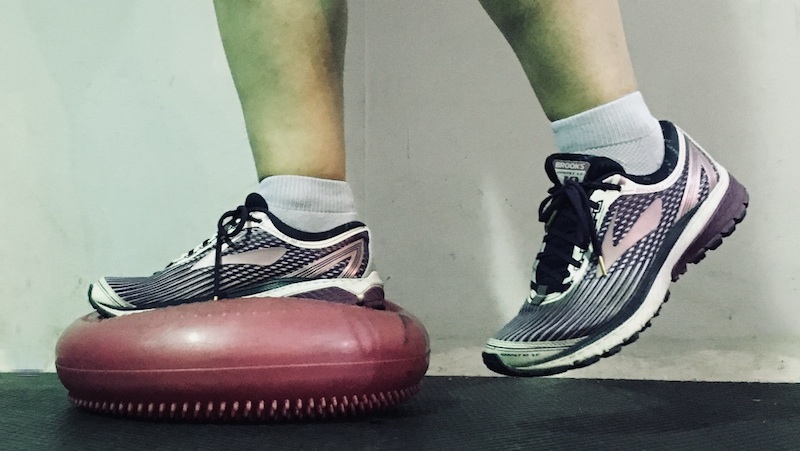
Balance exercise – I start by standing on one foot on the floor. Then swing my leg. Progress to a pillow. Without my shoe. Then a stability cushion. And a bosu ball. I stand next to a chair or wall to catch myself. Building strength in those little muscles in my feet has made a huge difference. It also has helped me not to take a spill on the ice during the winter and helps me catch myself when one of our cats affectionately tries its very best to trip me in the morning!